Which PDF: the Jago monthly statement (e-Statement) PDF from the Jago app. Screenshots, photos and scans cannot be read.
How to get a Jago monthly statement
e-Statement for all pockets (the one supported here)
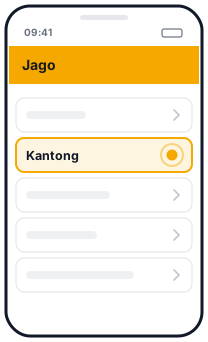 1Kantong
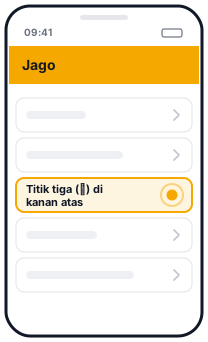 2Titik tiga (⋮) di kanan atas
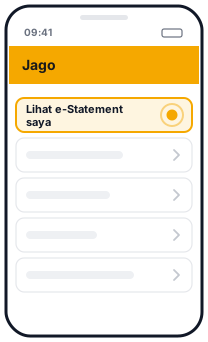 3Lihat e-Statement saya
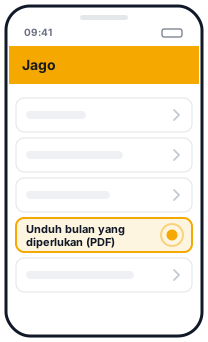 4Unduh bulan yang diperlukan (PDF)
Illustration, not the official app screen
- In the Jago app, open Kantong (Pockets).
- Tap the three dots (⋮) at the top right.
- Tap Lihat e-Statement saya (View my e-Statements).
- Tap download on the month you need. The file is a PDF.
Each file covers one month. For several months, download them one by one, then drop them all here at once.
Jago also offers an e-Statement per pocket (open the pocket, then the e-Statement menu) and Download riwayat transaksi (download transaction history) from the three-dot menu on the pocket page. This page has been tested with the all-pockets e-Statement. If you try another file and the result looks odd, let us know.
One table for each pocket
A Jago monthly statement is split by pocket (Kantong Utama or main pocket, savings pockets, GoPay pocket and others). This page reads each section separately:
- The pocket name and Pocket ID become the card title and the account column in Excel.
- Every transaction: date and time, source or destination, transaction details, notes, the amount marked
+or-, and the balance. - The reference number (
ID#) goes into its own column, so it is easy to search. - A pocket table that continues onto the next page is still read as one pocket.
Balance check per pocket
Jago prints a balance on every row, and for each pocket it prints Saldo Sebelumnya (previous balance), Total Pemasukan (total money in), Total Pengeluaran (total money out) and Saldo Akhir (closing balance). We recalculate each pocket's running balance, match it against every printed balance, then match all four summary figures. A pocket that matches gets a green tick. A pocket that doesn't shows the first row to check.
Things to note
- Interest and tax on interest appear as normal transactions in their own pockets.
- Shared pockets are read like any other pocket.
- Several months at once: drop all the PDFs, then download one Excel file with every pocket and a source file column.
Questions
Are all pockets converted?
Yes. Every pocket with transactions or a balance appears as a separate card. Empty pockets with a zero balance are skipped.
My Jago statement is in English. Is it supported?
Yes. The English version (Monthly Statements) has been tested on real statements. The Indonesian version is also recognised, with a beta label until it has been tested.
Is my file uploaded?
No. The PDF is read and converted in your browser and is never sent to a server.
Updated: 2026-10-20