Convert a GoPay e-Statement to Excel

No retyping: a whole statement done in seconds.

Drop your GoPay e-Statement (transaction history) PDF into the box below. Each transaction becomes one row, with the time, transaction ID and payment method.

Which statements would you like to convert?

Your file is never sent to a server. It's read right here in this browser, and gone when you close the tab. Check for yourself →

Not sure your bank works? Just try it. Nothing is uploaded, and if the file can't be read you'll see why.

    PDF · BCA, Mandiri, Jago, BNI, BRI, BSI, SeaBank, blu, GoPay, Gojek

    Free, no page limits ·No signup ·Never sent to a server

    • Processed on your computer
    • Every balance checked
    • No ads, no cookies

    Which PDF: the GoPay transaction history (e-Statement) PDF from the GoPay app. Screenshots, photos and scans cannot be read.

    How to get your GoPay transaction history

    The GoPay e-statement can only be downloaded in the GoPay app, not on the website:

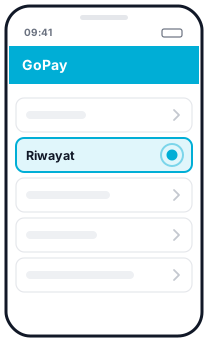
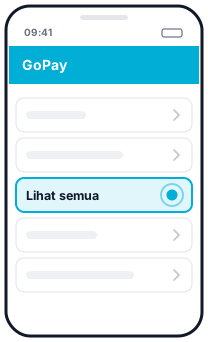
    1. Open the GoPay app and tap Riwayat (History) at the bottom of the home screen, then Lihat semua (See all).
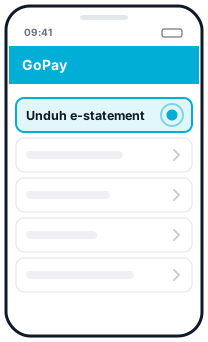
    2. Choose the option to download the transaction history e-statement.
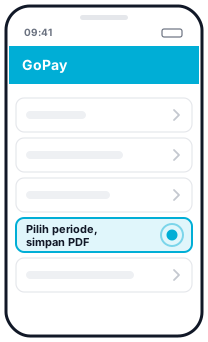
    3. Pick the period, then save the PDF.
    1. Step 1 in GoPay: Riwayat1Riwayat
    2. Step 2 in GoPay: Lihat semua2Lihat semua
    3. Step 3 in GoPay: Unduh e-statement3Unduh e-statement
    4. Step 4 in GoPay: Pilih periode, simpan PDF4Pilih periode, simpan PDF
    Download the e-statement in the GoPay app (GoPay)
    Illustration, not the official app screen

    This PDF has a table of dates, transactions, transaction IDs, payment methods and amounts, with Total income and Total expense at the top. That is the file this page reads. A receipt for a single transaction (Bagikan bukti bayar, Share payment receipt) or the Laporan pengeluaran (Spending report) summary are different files and can't be converted here yet.

    What you get

    GoPay transaction history is a table: date, transaction (merchant name), transaction ID, payment method and amount. This page turns it into Excel with:

    • Date and time (24-hour format) in separate columns.
    • The full transaction ID, even when the PDF splits it over two lines.
    • Payment method: GoPay Saldo, card, or GoPay Coins.
    • Debit and credit: spending (-Rp) and income (+Rp) as numbers ready to add up.

    Total check

    GoPay prints Total income and Total expense for the selected period. We add up all the rows and match them against both figures. If they match, you see a green tick. If not, the difference is shown.

    Things to note

    • GoPay Coins. For transactions paid with GoPay Coins, the PDF only prints the coins. See the question below on how we handle this.
    • Gojek trip and order history has its own page: Gojek history to Excel.

    Questions

    Why are some GoPay Coins transactions flagged?

    For payments made with GoPay Coins, the GoPay PDF only prints the number of coins, not the rupiah amount. If there is only one such transaction, we work out its rupiah amount from the Total expense and add a note. The total can then no longer be used to check the other rows.

    Is there a balance column?

    No. GoPay history does not print a running balance, so the check uses the Total income and Total expense printed at the top.

    Is my file uploaded?

    No. The PDF is read and converted in your browser and is never sent to a server.

    Updated: 2026-10-20

    Three steps

    How to convert a bank statement to Excel

    1. 1

      Drop your PDFs

      The original e-statement PDF from your bank, one or several at once. If the PDF is locked, enter its password.

    2. 2

      Look for the tick

      Preview every transaction. A green tick means opening balance + transactions = closing balance, and every row matches.

    3. 3

      Download Excel or CSV

      Several statements merge into one file, with a column showing where each row came from.

    Privacy and accuracy

    Your data stays on your computer

    Other converters upload your statement to their servers. Here, the PDF is read directly in your browser and never sent anywhere.

    Never uploaded

    The PDF is read and converted in your browser. The page is even locked so it cannot send data to other sites.

    Every balance checked

    Running balances are checked row by row. If anything doesn't match, the first wrong row is flagged.

    Free, no limits

    No signup, no credit card, no daily page limit.

    Password-protected PDFs

    Locked e-statements open with their password. The password is never stored.

    Many files at once

    A client's whole year of statements merged into one Excel file.

    Indonesian number formats

    1.234.567,89, DB/CR markers and dates without a year are read correctly, so the numbers in Excel are ready to sum.

    Check for yourself that nothing is uploaded

    1. Open your browser's Developer Tools (F12, or Cmd+Option+I on a Mac) and choose the Network tab.
    2. Drop your PDF onto this page and convert it.
    3. Look at the request list: none carries your file (small requests to /ingest are anonymous counts with no file content). You can also disconnect from the internet once the page has loaded, and conversion still works.

    For accountants & tax consultants

    Client bank statements, without retyping

    For accountants, tax consultants, audit firms and bookkeepers: many statements at once, numbers that are checked, and client data that never leaves your computer.

    A whole year at once

    Drop 12 or more PDFs at once. You get one Excel file, with the source file and account on every row.

    Straight into accounting software

    Export each account for Jurnal, Xero, QuickBooks, Odoo or Zoho Books, in each tool's own import format.

    Numbers you can stand behind

    Every running balance and total is checked against what the bank printed. Rows that don't match are flagged, so you know exactly what to look at.

    Client data stays confidential

    PDFs are read in your browser and never sent to a server. No account, and nothing is stored.

    Password-protected PDFs

    Enter the password once. Other files locked with the same password open too.

    Free, no limits

    No signup and no page limits, for one client or a hundred.

    More for accountants →

    Supported banks

    Supported banks and e-wallets

    Beta means that format hasn't been tested on a real statement yet: results are still checked against the printed balances, but check them more carefully. Other banks can be tried too. Something not read? Use the Send an anonymised sample button or let us know, without sending your statement.